
Other cookies are configurable.
AI cycling coach
Personal cycling training plan
Power and heart rate workouts — from your first 100 km to gran fondo. AI recalculates your plan every week, and a real coach answers in the chat.
14 days of Premium free
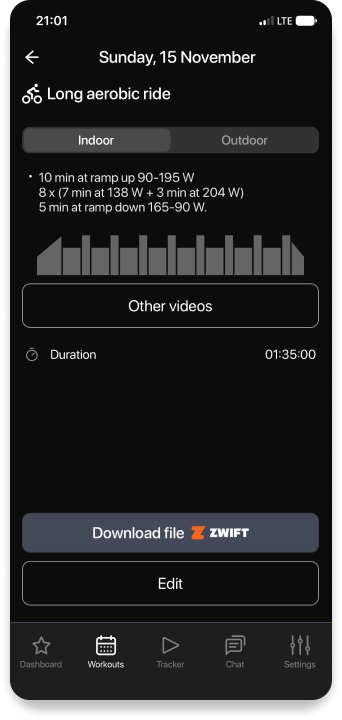
Zwiftworkout export for indoor training in winter
- 01Answer a few questions about yourself and your goal
- 02Connect your watch — rides upload automatically
- 03Every week the plan adapts to you
Power-based training
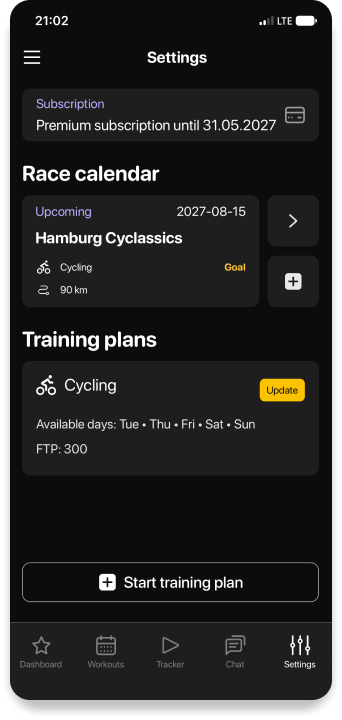
Every workout is in your zones: power, heart rate, duration and intervals. Zones are calculated from your FTP — the power you can hold for about an hour.
- Zones are recalculated as your FTP grows
- No power meter? Train by heart rate
- Your FTP progress is visible in the app
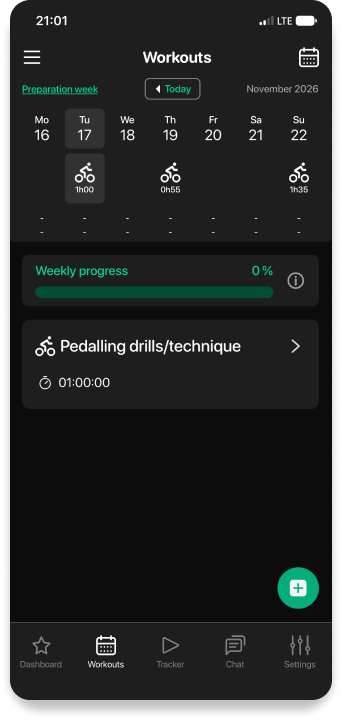
What it looks like in the app
From your goal and FTP to a weekly plan and a workout in watts for every ride.
Indoor training in winter
Your season doesn’t stop: bike workouts are sent to Zwift and Garmin, and the completed ride comes back to the app and counts in your plan.
- Workout export to Zwift and Garmin
- Rides upload from Garmin, Apple, Polar and Strava
- In summer — the same zones on the road
| Warm-up 15 min | Z2 |
| 4 × 8 min | Z4 |
| Rest 4 min | Z1 |
| Cool-down 10 min | Z1–Z2 |
Goals we train for
100 km
Your first 100
We build up volume gradually so you can ride 100 km or more in one go.
FTP
More power
Intervals in your zones so your FTP grows month after month.
Race
Gran fondo and races
Gran fondos, road races, time trials — preparation for your race date.
Brevet
Long distances
Brevets and big seasons — up to 10,000 km: endurance, nutrition and recovery.
Cycling FAQ
Is it right for me if I just ride for myself?
Yes. You can choose any goal: ride your first 100 km, stay in shape or simply ride regularly. The plan starts from your current level.
Do I need a power meter?
Not necessarily: you can do the workouts by heart rate. With a power meter or a smart trainer the training is more precise.
Can I prepare for a gran fondo or a brevet?
Yes. Enter the race and its date — the plan builds up to that day, and your coach will help with nutrition and tactics.
Can I train both outdoors and indoors?
Yes. Each workout has an “Indoor” and an “Outdoor” option, and for the trainer there’s a Zwift file and export to Garmin.
I want to combine cycling with running and swimming
Then choose a triathlon goal — the plan will balance the load across the three disciplines. More about triathlon →
Is there a free trial?
Yes. The first 14 days of Premium are free. Current prices are shown in the app.
Didn’t find an answer? Write to us: team@omysport.com
Start preparing for your season today
14 days of Premium free